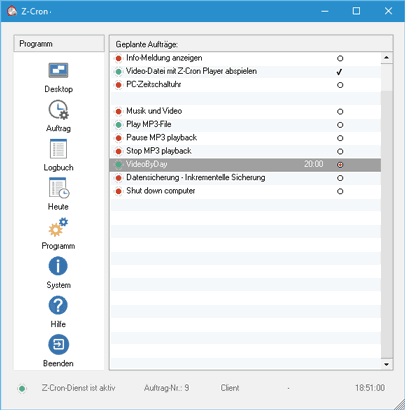

These tasks can be started automatically at the following points in time (also in 5 minute intervals):
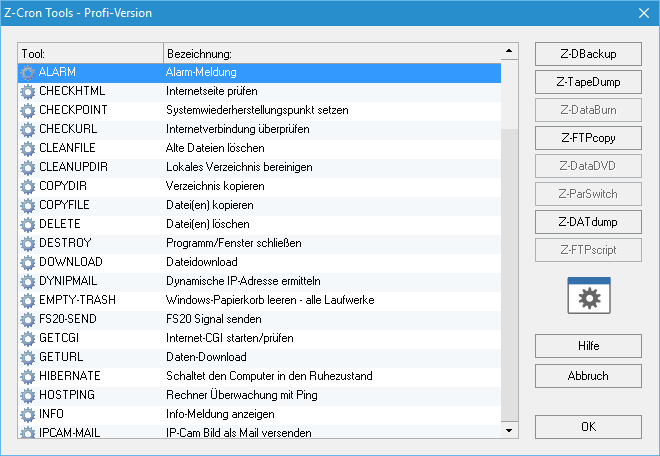
Z-Cron scheduler does not only start other applications but can also show popup windows with reminder text messages on the screen or shut down the system at a predefined time. The embedded tools can be easily used by either just writing the command's name into the input field (you have to use capital letters!) or using the button "Tools" for a tool selection menu.
| Function |
Description |
Freeware |
| ALARM |
Shows the Z-Alarm-clock window for 4 minutes. The sound will be played with the built-in speaker, in contrast to the command Z-ALARM (NT/2000/XP/Vista). |
 |
| CHECKURL |
Check for internet connection and run a command if no connection has been established. |
 |
| CLEANFILE |
Scheduled deleting of files which are older than XX days. You can set the age of the files in an input field in the task's setup. |
 |
| CLEANUPDIR |
Delete all files and subdirectories in the selected directory which are older than XX days. You can set the age of the files using an input field in the task 's setup. This command works recursivly. |
|
| COPYDIR |
Copy a directory. |
 |
| COPYFILE |
Copy file(s). |
 |
| DELETE |
Delete file(s). |
 |
| DESTROY |
Close a window/application. |
 |
| DOWNLOAD |
Download file via HTTP protocol. |
 |
| DYNIPMAIL |
Discover dynamic IP address and send email if it changes. |
 |
| EMPTY-TRASH |
Empty Windows recycle bin on all drives. |
 |
| GETURL |
File download using HTTP protocol. |
 |
| HIBERNATE |
Sets computer into hibernate mode with the possibility to reactivate it after a certain period of time. |
 |
| HOSTPING |
With this function you can send "PINGs" to a host name to test a computer's reaction time and availability. |
 |
| INFO |
Shows the saved info message on the screen for 4 minutes. |
 |
| KILL |
Quits a program. |
 |
| KILLWIN |
Quit a program given its window name. |
 |
| KILLWIN-JOB |
Quit a program given its window name and run a Z-Cron job afterwards. |
|
| LASTRUN |
Launches a program and shuts down the computer after the program has finished. |
 |
| LOCKMYPC |
Lock computer/workstation. |
 |
| LOGFILECLEAR |
Delete Z-Cron log file. |
 |
| LOGOFF |
Log out of the system. |
 |
| MAIL |
Send email with SMTP. |
 |
| MESSAGE |
Send message to a computer or workgroup (Microsoft messenger service). |
 |
| MONITOROFF |
Switch off screen (Powersave). |
 |
| MONITORON |
Switch on screen (Powersave). |
 |
| MOVEDIR |
Move directory/folder. |
|
| MOVEFILE |
Move file(s). |
|
| MSSQL-DESK-START |
Starting MSSQL desktop. |
 |
| MSSQL-DESK-STOP |
Ending MSSQL desktop. |
 |
| NICSTART |
Switch on a selected network interface card. |
 |
| NICSTOP |
Switch off a selected network interface card. |
 |
| NTPTIME |
Synchronize system time with a NTP time server. You need access to a time server and must not use a firewall blocking UDP port 37 because time is adjusted using this port. |
 |
| OPEN |
The display is carried out with the application registered for the file type. |
 |
| PING |
Command to send "PINGs" to an IP-Address to test a computer's reaction time and availability. |
 |
| PLAY |
Playing multi-Media file. The account is carried out with the application registered for the file type. |
 |
| POWERCHANGE |
Switch electrical device over the USB port. |
 |
| POWEROFF |
Switch off electrical device over the USB port. |
 |
| POWERON |
Switch on electrical device over the USB port. |
 |
| RAS-DIAL |
Establish an internet/VPN connection with Dialup network connections (Modem/ISDN). |
 |
| RAS-HANGUP |
Disconnect internet/VPN connection. |
 |
| REBOOT |
Reboot computer. |
 |
| REMOTE-SHUTDOWN |
Shut down a remote computer (Windows NT, 2000, XP or Vista) in your network. |
 |
| RMDIR |
Delete a directory. |
 |
| SCREENMAIL |
Send screen as image via email. |
 |
| SCREENSAVEON |
Switch on screensaver. |
 |
| SCREENSAVEOFF |
Switch off screensaver. |
 |
| SELFTEST |
Virus self test. |
 |
| SENDLOGFILE |
Send Z-Cron log file as e-mail. |
 |
| SERVICE-RESTART |
Restarts the selected system service. |
|
| SERVICE-START |
Starts the selected system service. |
|
| SERVICE-STOP |
Stops the selected system service. |
|
| SERVICE-WATCH |
Monitors the selected system service. |
|
| SHUTDOWN |
Shut down computer (only Windows 2000/XP/Vista). |
 |
| SHUTDOWN-MESSAGE |
Shut down computer with alert message (only Windows 2000/XP/Vista). |
 |
| STANDBY |
Sets the computer into Standby mode. |
 |
| STARTREMOTE |
Start a Z-Cron job on a computer in the network. |
|
| TIMEMARK |
Write a timestamp into the log file. |
 |
| UNZIP |
Unzip ZIP file in the indicated directory. |
 |
| VBSRIPT |
Execute VBScript code. |
 |
| VOLUMECONTROL |
Change volume or set to "mute". Currently not supported on Windows Vista/7. |
 |
| WAKEUPLAN |
Switch on computers in the local network. |
 |
| WALLPAPER |
Change Windows desktop background picture. |
 |
| WATCH |
Monitors a program. If a monitored program "dies", it will be restarted. |
 |
| WATCH-JOB |
Program supervision starts a Z Cron job if the indicated program hasn't started. |
|
| WAVEPLAY |
Play a .wav file. |
 |
| Z-ALARM |
Shows Z-Alarm clock window for 4 minutes and plays the file zcron.wav. |
 |
| ZIPFILE |
Save file into a ZIP file. |
 |
| ZIPFOLDER |
Save directory into a ZIP file. |
|
Z-Cron is an ideal extension to my Z-DATdump program. Z-Cron is Freeware for private use which means that it runs on workstations (Windows 2000, XP, Vista and 7) without limitations and it can be installed on servers (NT/2000/2003/2008) for testing purposes. The freeware version is limited to a trial period of 14 days on a Windows Server„ operating system! For commercial use or use on a Windows Server™ a server license is required!
This free Z-Cron version is exclusively intended for personal use on a single PC (workstation). Copying and redistribution of the complete program package is allowed for personal use only.
Commercial or professional use of this Z-Cron Freeware version is not allowed! For commercial use you have to buy a license!