The Z-Cron Scheduler can also be installed as a system service on Windows. A service is a type of application that is run in the background and is comparable to a UNIX/Linux Daemon application. Services are special programs that provide functionality independent of logged-in users.
Data exchange between service and desktop
If Z-Cron is started as a service, it is by default running as a task of the (invisible) user account “LocalSystem”, which enables a data exchange between the service and the desktop, i.e. all applications started by the Z-Cron system service are shown on the user’s desktop.
Changes to the service settings
In most cases it is not advisable to change the setting “allow data exchange between service and desktop”. If the setting must be changed and the data exchange between the service and the desktop must be disabled, this setting can be accessed directly from Z-Cron.
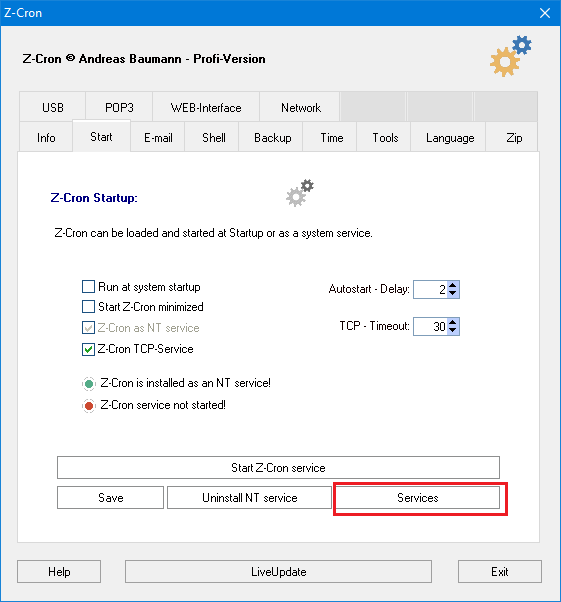
Start the Z-Cron program setup (by clicking the program icon in the main window).
Open the service management in the program setup window (tab “Start”).
Find the service “Z-Cron” in the list of services, then right click the service and select “Properties”.
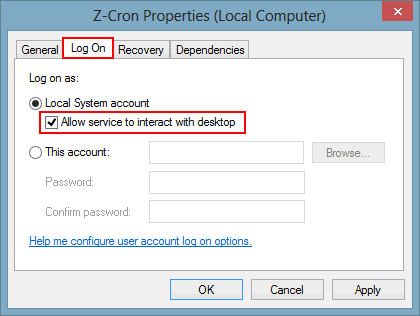
In the dialogue “Z-Cron Properties” go to the tab “Log On” and activate the option “Allow service to interact with desktop”.
Click “OK” to save the changes.
Now right click the Z-Cron service again and select “Start” from the context menu.
Problems with Access Rights
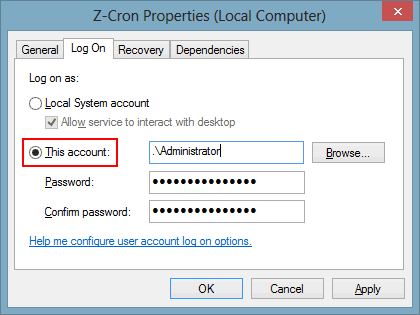
If Z-Cron is started as a system service, it is by default running with the (invisible) user account “LocalSystem“. This account has reduced rights, for example no access rights to network resources. Therefore you might run into issues with access rights during execution. You can change this by running Z-Cron service with administrative rights. Depending on your network environment, either the local administrator account or the domain administrator account has to be put into the form, or at least a user with suitable rights!